How to See What ChatGPT Says About Your Company as an Employer

To see what ChatGPT says about your company as an employer, ask it the questions candidates ask, in a clean session, in every market and language you hire in, then record the answer, the sources it cites and the other employers it names. Repeat the same prompts in Google AI Overviews, Google AI Mode, Perplexity and Gemini, and again every month, because a single answer is an anecdote and a series of answers is a measurement.
This matters because the AI answer now sits early in the job search and the candidate journey. In PerceptionX research across seven countries, 72% of AI-using job seekers used AI before deciding whether to apply, and 82% said an AI answer changed their mind about a company as a place to work.
This guide is the practical method: which questions to ask, where, what to write down, how to read the sources and how to compare answers over time. For the wider strategy behind your company's employer brand in AI, read our guide on how to improve your employer brand in ChatGPT and other AI assistants.

What does ChatGPT say about my company? Why there is no single answer
When a talent leader asks "what does ChatGPT say about my company", they usually expect one paragraph. There isn't one.
ChatGPT responses are generated fresh each time. The answer changes with the wording of the question, the language, the country, the role the candidate mentions, whether web search runs, and what the assistant remembers about the person asking.
So the useful question is narrower: what do AI tools like ChatGPT say about us to a candidate for this role, in this market, asking this question? Answer that across a set of prompts and you have a picture of your AI employer brand that you can track.
It is also why AI search is reshaping employer branding. For years the employer wrote the first impression on career sites and in job descriptions. Now generative AI writes it, mostly from third party sources the employer does not own, before the candidate ever reaches your own site or your career sites. The applicant journey now starts inside that answer.
Why AI search now sits at the start of the applicant journey
For many candidates, the AI answer is the first interaction they have with your employer brand. It shapes the first impression before they read your careers page, your job postings or a single review.
Candidates use AI tools like ChatGPT to build a shortlist, to check what it is like to work somewhere and to test what they have heard. In each case the answer frames how candidates evaluate employers from that point on in the candidate journey.
What shapes the answer
Most AI tools combine what the model learned in training with what it finds in live search. For employers, that mostly means third party sources: review sites, LinkedIn, Reddit, news, industry publications, rankings and job boards.
Employee-driven content carries a lot of weight. What current and former employees write in employee reviews, forum threads and LinkedIn posts often decides the tone of the answer about your company culture.
AI also places you in a consideration set. It decides which employers you belong with based on the peers you are written about alongside, so the company you keep in rankings and articles affects whether you are named.
AI search also rewards consistency. When third party platforms, your career sites and your own posts tell the same employer brand story, AI responses repeat it more often and more accurately.
Your wider public presence counts as well. Customer complaints and customer service stories can colour how AI describes you as an employer, especially for frontline and customer-facing roles.
Where the evidence is thin, or there are gaps in your online presence, the answer goes generic or out of date. A distinctive employee value proposition that only appears on your careers page often never reaches the answer, and old stories fill the gap.
Step 1: Set up a clean session and protect company data
Do not run your checks from your personal ChatGPT account as it is. Memory, custom instructions and past chats about your own employer all shape the answer, so you will see a version tuned to you, not what a candidate sees.
Use a temporary chat on the ChatGPT website, or a fresh account with memory switched off, and make sure web search is on, because most candidates now get search-backed answers. Candidates use the same tools you do, just without your history.
A work account inside a company ChatGPT workspace has the same problem, plus another. Workspace admins may have access to usage analytics and conversation logs, and your workspace settings can differ from the free product candidates use.
Keep data security in mind too. You are asking public questions, so there is no reason to paste company data, internal survey results or file uploads into any assistant during an audit. If a personal account is all you have, clear memory first and note that in your log.
Run the other assistants the same way: Google AI Overviews and Google AI Mode in a private browser window, Perplexity and Google Gemini signed out or in a clean profile.
Step 2: Decide where to look: markets, languages and job functions
Most talent teams check one market in English and stop. That gives a misleading picture of an employer brand that hires globally. Candidates do not ask that way, and the answers they get differ by country, language and role.
Markets
List the countries where you hire at volume or where hiring is hardest. Set the assistant to that location where you can, or name the country in the prompt. A strong answer in your headquarters market says nothing about the market where you are struggling to fill roles. Your employer brand can be visible in one talent market and absent in the next.
Languages
Ask in the language candidates use. A prompt in German, Spanish or Arabic often draws on local review sites, local news and local job boards that never appear in English answers. Ask a native speaker on your team to write the prompts, not a translation tool, so the phrasing matches how people actually ask.
Job functions
Pick the handful of functions that matter most to your hiring plan, such as engineering, sales, operations and early careers. A software engineer and a warehouse supervisor ask different questions and get different answers about the same employer. Write each prompt as that candidate would.
Step 3: Ask the questions candidates ask
The biggest mistake is asking only "what is it like to work at [Company]?" That tells you how AI tools like ChatGPT describe your employer brand once a candidate already has you in mind. It tells you nothing about whether they would ever think of you.
Build a short set of chatgpt prompts that covers four kinds of question. Base it on the prompts candidates actually type, in their words, not in your brand language. Our guide to what candidates ask AI when researching employers shows how to build them around hiring personas, and how to prompt AI to audit your employer reputation lists more prompts by type.
| Question type | Example prompt | What it shows you |
|---|---|---|
| Discovery | Which companies in [industry] in [country] are best for a software engineer? | Whether you are on the shortlist at all, and who is named instead |
| Discovery | Which employers in [city] have the best work life balance for [role]? | Whether AI links you to the values you claim |
| Experience | What is it like to work at [Company] as a [role]? | How AI describes your company culture, pay, managers and growth |
| Experience | How does the hiring process at [Company] work? | Whether stages, timelines and interview format are described accurately |
| Comparison | [Company] or [Peer]: which is better for career growth in [country]? | How you are positioned against the employers you compete with for talent |
| Factual | Does [Company] offer remote work or relocation for [role]? | Whether policy facts are current or pulled from old posts |
Discovery questions
These do not name you. They ask which employers are good in a field, a city or for a role, or which have the best work life balance, the best training or the best pay. They show whether you are on the shortlist at all.
Even well known companies are often missing here, because discovery answers lean on lists, rankings and articles rather than on any one employer's pages.
Experience questions about company culture and the hiring process
These name you and ask what it is like to work there: company culture, workplace culture, managers, pay, flexibility, the hiring process. They show how AI describes you once a candidate is already interested. Ask it directly as well: how does ChatGPT describe [Company] as an employer?
Comparison and factual questions
Comparison prompts put you against a named peer. Factual prompts ask direct questions about benefits, locations, remote policy or visa sponsorship. Together they show how candidates evaluate employers side by side, and whether the facts behind that judgement are right. Comparison answers also show who AI thinks you compete with in the talent market.
Step 4: Run the same prompts across AI platforms
Candidates use different AI platforms, and each one builds its answer from different sources. Brand visibility on one tells you little about the others. ChatGPT, Google AI Overviews, Google AI Mode, Perplexity, Google Gemini and Copilot can give quite different answers to the same question.
Google AI Overviews matter even for candidates who never open an assistant, because they appear above the search results for many employer questions. Google AI Mode goes further and replaces the list of links with a conversation.
Run every prompt in every one of the AI tools you check. Treat each of the AI platforms as its own channel for employer brand visibility, the way you treat each review site separately. Then run each prompt more than once. These models rarely give the same answer twice, so look for what stays constant across AI responses: whether you are named, the words used about you, and the sources that keep coming back.
Step 5: Record every answer in the same format
Screenshots in a shared folder are not a record, and they make employer brand trends impossible to see. You need the same fields for every answer, so you can compare across assistants, markets and months. A spreadsheet is enough to start.
| Field | What to record |
|---|---|
| Date and assistant | The day you ran the prompt and the assistant and mode used, such as ChatGPT with search on or Google AI Mode |
| Market, language, role | The country, the language of the prompt and the job function you were asking as |
| Prompt | The exact wording, copied, so you can rerun the same prompts later |
| Named or not | Whether your company appears, and where in the answer it appears |
| Description | The words used about you: culture, pay, leadership, flexibility, stability, growth |
| Sentiment | Positive, mixed or negative, with the sentence that made you decide |
| Accuracy | Anything wrong or out of date, with the correct fact next to it |
| Sources | Every domain cited or linked in the answer |
| Other employers | Which peers are named alongside you or instead of you |

Write down how ChatGPT describes your company in its own words, not your summary of it. "Known for long hours" and "fast-paced environment" are different findings, and the exact phrase usually points to the source it came from.
Mark sentiment simply and consistently. The goal is to track sentiment over time, so a simple scale used the same way every month beats a detailed one used differently by each person.
Step 6: Read the third party sources behind ChatGPT responses
The sources are the most useful part of the answer, because they are the part you can act on. When an assistant shows citations or links, log every domain. When it does not, ask a follow-up: "Which sources did you use for that?"
Group the third party domains you find into a few types. AI search tends to lean on a small set of third party sources for each market and question type, so the same names will repeat. Our analysis of the sources AI cites when candidates research employers covers the most common ones.
Review sites, employee reviews and job boards
Glassdoor, Indeed and local review sites feed most answers about pay, managers, culture and the hiring process. If the answer echoes old complaints, the review data is where they live. Note the date of the reviews AI quotes: recent review data and old review data call for different responses.
Professional and community platforms
LinkedIn posts, Reddit threads and YouTube videos carry the employee voice. They shape how candidates perceive the day-to-day reality of a job far more than polished brand messaging, and candidate perceptions formed there are hard to shift.

Lists, rankings and media coverage
Best-employer lists, industry rankings and media coverage drive discovery answers and much of your brand visibility in AI search. If peers are named and you are not, check which lists and articles the assistant is quoting.
Your careers page, own site and job postings
Your careers page and job postings are cited mainly for factual questions such as benefits, locations and the hiring process. Your own site rarely decides whether you are recommended, but it is where AI looks to check facts. Search engines and assistants both read it, so keep it accurate and specific. Your careers page should answer the factual questions candidates ask in plain sentences, not only in images or video.
If one outdated article or one unanswered review thread appears again and again, you have found the source that is shaping your answer.
Step 7: Track employer brand visibility and sentiment over time
The first round of checks is your employer brand baseline in AI search. After that, rerun the same prompts on a fixed schedule, monthly for most teams, using the same session set-up, markets, languages and roles.
Compare like with like: the same period, the same assistant, the same prompt set. If you change the prompts, start a new baseline instead of comparing against the old one.
Track a handful of measures for each round:
- Employer brand visibility: the share of discovery answers that name you, by market and role. Count employer brand mentions in discovery answers separately from experience answers, where you are named by definition.
- Brand sentiment: how positive or negative the description is when you are named.
- Accuracy: how many facts in the answer are wrong or out of date.
- Sources: which domains appear, and which are new or have dropped out.
- Peers: which employers are named alongside you, and how often.
When a figure moves, check whether it moved in each assistant or only in one. A change that holds across ChatGPT, Google AI Overviews, Google AI Mode and Perplexity is real. A change in one assistant may only be a model update.
This is the basis of employer brand tracking: continuous tracking of the same questions, so you can see whether your employer brand strategy is changing what candidates hear. Treat it as part of your wider employer brand reporting, next to reviews and hiring data, so AI responses sit alongside every other measure of employer brand health. Our guide to employer reputation monitoring covers how AI answers fit alongside reviews, social media and news.
How to read what you find
Most audits end up with one of four patterns, and each points to a different response from the employer brand team.
You are missing from discovery answers
The problem is not your careers site or your career sites in other markets. It is your presence in the lists, rankings, articles and communities that discovery answers draw on, in that market and language.
You are named, but the description is thin
AI has little specific material about you, so it falls back on generic phrases. Specific, consistent content about roles, teams and working practices, published where AI reads it, gives it more to work with.
You are named, but the description is negative
Look at the sources. If the criticism comes from current employee reviews, it is an experience problem to fix inside the organisation, not a messaging problem. If it comes from old material, the newer evidence is missing.
The answer is wrong
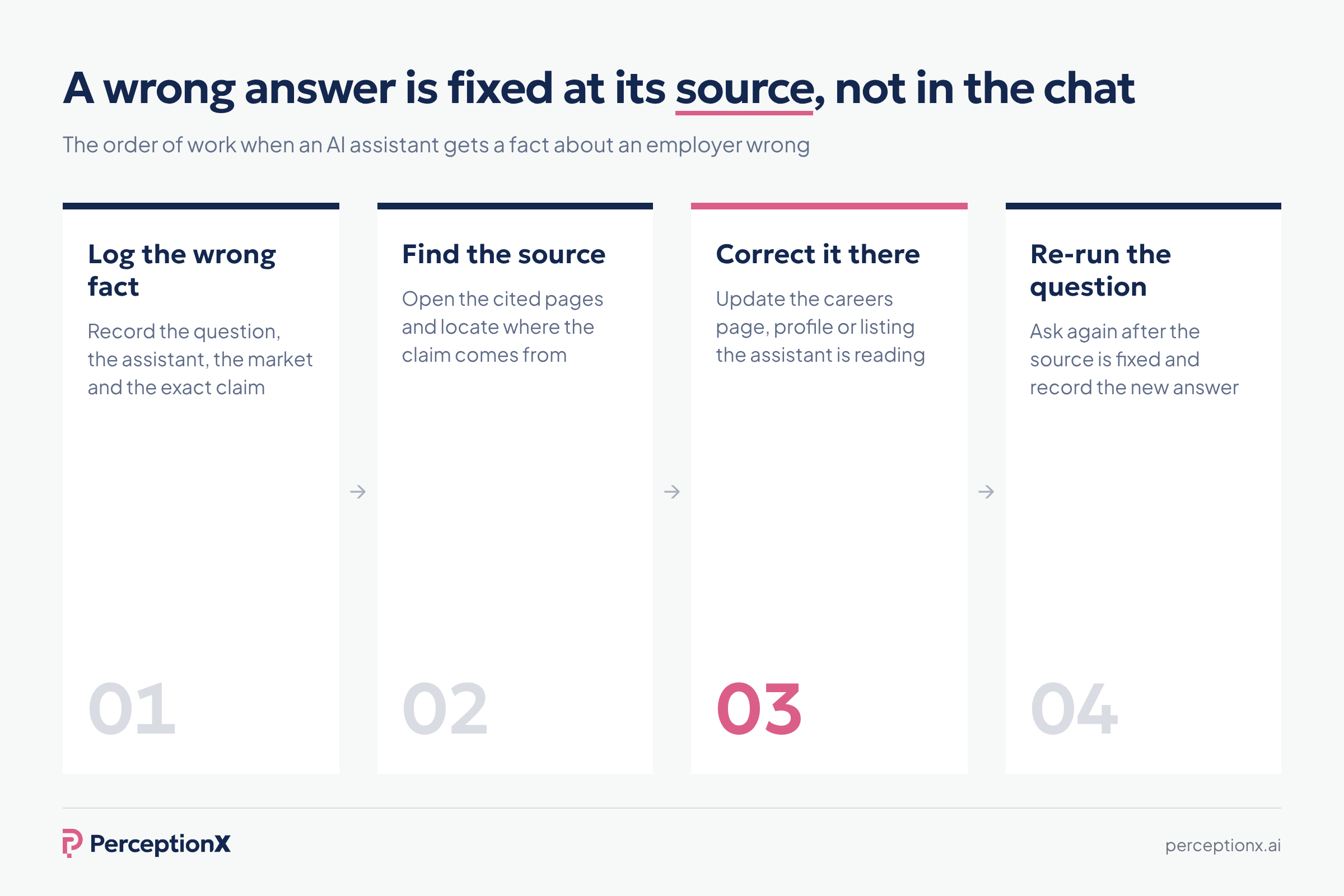
AI often gets employers wrong. In the same PerceptionX research, 58% of job seekers had caught AI giving inaccurate information about an employer. Log the wrong fact, find the source it came from and correct it there, on the page or profile the assistant is reading.
How to improve employer brand in ChatGPT and other AI answers
If you want to improve your employer brand in AI answers, start with what you can influence. No one can guarantee how an AI assistant describes you, and you cannot pay to change an organic answer. What you can change is the evidence the answer is built from, and then measure whether the answer moved.
- Fix the facts on your own site. Put benefits, locations, flexibility, interview stages and pay ranges where you can on your careers page and in job descriptions, in plain text that is easy to quote.
- Keep content consistent across channels. When your careers page, job postings, LinkedIn page and review site profiles say the same thing, AI repeats it with more confidence.
- Respond to employee reviews. Thoughtful replies on review sites add your side to the sources AI reads most for experience questions.
- Strengthen third party platforms. Keep your profiles on review sites, job boards and professional networks complete, current and consistent with your employer brand.
- Get onto the lists that matter. For discovery answers, work on the rankings, awards and articles that assistants cite in each market.
- Support employee voices. Real LinkedIn posts and community answers from employees carry more weight than brand messaging.
- Fix real problems. If the sources reflect a genuine issue, the answer will only improve when the experience does.
Our full guide on how to improve your employer brand in ChatGPT covers which sources move which kinds of answer.
The limits of manual checks in AI tools
Checking AI tools by hand is the right way to start. Everyone on the team should see the answers candidates see at least once.
It does not scale well. Every market, language, role, assistant and repeat run multiplies the work, and a spreadsheet of answers is a small sample of something that varies every time it is asked. Most talent teams run it once or twice and then stop, and the employer brand picture goes stale as AI tools and AI search keep changing.
General AI visibility tools built for marketing help with product questions, but they are designed around customer queries. They do not ask the questions candidates ask, across AI platforms, by role and market, and they do not score answers the way employer brand and TA teams need.
Ownership matters too. Employer brand tracking in AI sits best with the employer brand or talent acquisition team, working with communications, because the sources behind the answer span reviews, careers content, social media and the press.
Tracking your AI employer brand at scale
The alternative is a dedicated employer reputation platform that runs the questions for you, on a schedule, and turns the answers into comparable scores.
PerceptionX is one. It is an employer reputation partner whose technology runs the questions candidates ask across ChatGPT, Google AI Overviews, Google AI Mode and Perplexity, by market, job function and language.
Measurement is only the start: every finding comes with recommendations on what to change, and practitioners who have measured employer brand for years help your team act on them.
Every tracked employer is measured the same way, so results compare across markets and over time. It scores each tracked employer on Visibility, Sentiment and Relevance in the Employer Perception Score, so you can compare brand visibility with your talent competitors and see where you are named, how you are described and whether the answer matches what candidates in that role care about.
It also traces each answer to the sources behind it, so you can see which review sites, communities, lists and pages shape your answer in each market, and which ones to work on first. It turns continuous tracking into a trend your employer brand team can report on, and gives you comprehensive monitoring of the AI side of your employer reputation without rebuilding the spreadsheet every month.
Our scores are independent: they come from what AI actually says, not from what employers tell us.
Key takeaways
- There is no single answer to what ChatGPT says about your company. It changes by question, market, language, role and assistant.
- Check in a clean session, not your personal account or a company workspace, so you see what candidates see.
- Ask discovery, experience, comparison and factual questions, in each market and language you hire in.
- Record every answer in the same format, including the sources and the other employers named.
- The sources tell you what to change. Your own site matters for facts; third party platforms decide most of the rest.
- Rerun the same prompts monthly and compare like with like, assistant by assistant.
Frequently asked questions
What does ChatGPT say about my company as an employer?
It depends on who asks and how. ChatGPT builds each answer from the question, the language, the market and the sources it finds, so the description a software engineer in one country gets can differ from what a sales candidate in another country gets. To find out, ask the questions candidates ask in a clean session and record the answers.
How to see what ChatGPT says about my company as an employer?
Open a temporary chat with web search on, then ask discovery questions that do not name you and experience questions that do, for each market, language and role you hire for. Record the answer, the sources cited and the other employers named, and repeat the same prompts in Google AI Overviews, Google AI Mode, Perplexity and Gemini.
Which AI assistants should I check?
Start with ChatGPT, Google AI Overviews, Google AI Mode and Perplexity, then add Gemini and Copilot if your candidates use them. Each assistant draws on different sources, so one assistant gives you one data point, not the full picture.
How do I track how AI describes my employer brand over time?
Set a baseline with a fixed prompt set, then rerun the same prompts every month in the same set-up. Track whether you are named, sentiment, accuracy, sources and the peers named alongside you, and check that any change holds in each assistant, not just overall. An employer reputation platform can automate this across markets and roles.
How do I improve my employer brand in ChatGPT?
Change the sources the answer is built from. Keep facts accurate and consistent on your careers page and job postings, respond to employee reviews, earn a place on the lists AI cites for discovery questions and support real employee voices on LinkedIn and in communities. Then measure whether the answer changed.
How do I get my company recommended by AI as an employer?
Discovery answers draw mostly on third party lists, rankings, articles and community discussion, so work on being present and accurately described there in each market you hire in. Keep your own careers content specific and consistent, then rerun the same discovery prompts to see whether you start to appear.
Why does ChatGPT give different answers about my company each time?
AI answers are generated, not stored. Small differences in wording, location, language, memory and search results change the output, which is why a single check is an anecdote and repeated checks with the same prompts are needed to measure anything.

Find out how AI is shaping your employer brand — and what you can do about it.